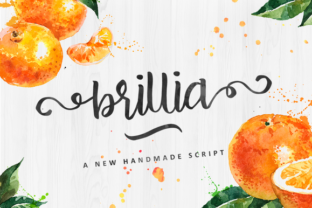
Adding a Human Touch with Brillia Script: A Practical Guide
When you design a brand identity, craft a marketing campaign, or produce personal creative work, the selection of typefaces is a critical decision. It moves beyond aesthetic preference into the realm of communication strategy. Your chosen fonts set a tone, convey a personality, and establish a visual relationship with your audience. In a digital landscape often dominated by geometric sans-serifs and ultra-legible system fonts, the desire for warmth and organic character is palpable. This is where a typeface like Brillia Script finds its practical place.
Understanding Brillia Script's Role
Brillia Script is a beautiful handmade script typeface with a natural look. It is not a formal, rigid calligraphy font, nor is it a casual, brush-style script. Its character lies in its balanced, crafted appearance—it feels personal without being overly informal, elegant without being cold. This specific quality makes it a versatile tool for professionals and creators who need to inject a sense of human craftsmanship into their projects.
From a process perspective, integrating Brillia Script typically occurs during the asset selection and design execution phase. After establishing your project's core objectives and messaging, you curate visual elements that support those goals. Brillia Script enters the workflow as a potential solution for specific applications where traditional fonts might feel too sterile or corporate.
Integrating Brillia Script into Common Workflows
The key to effective use is understanding its complementary role. Brillia Script rarely serves as a primary body font for long texts. Its strength is in accentuation and enhancement. Here are concrete ways it can be applied within different professional and creative processes.
For Branding and Identity Projects
When developing a logo, packaging, or brand collateral for a business that values artisanship, authenticity, or personal connection—such as a boutique bakery, an independent publisher, or a craft workshop—Brillia Script offers a compelling option. It can be used for the business name itself in a logo, or for key supportive elements like taglines, product names on labels, or section headers on a website.
Implementation Tip: Pair it with a robust, simple sans-serif or serif font for all body text, legal information, and lengthy descriptions. This maintains overall usability and readability while allowing Brillia Script to provide the distinctive personality highlight. Test the pairing at various sizes and on different backgrounds to ensure the script remains clear and legible in its intended contexts.
In Marketing and Campaign Materials
Digital ads, social media graphics, and email campaign headers often benefit from a focal point that grabs attention through texture and style. Using Brillia Script for a single, powerful keyword or a short, evocative phrase can set your material apart. For example, a headline like “Handcrafted for You” or “Our Story” rendered in Brillia Script immediately communicates a different ethos than the same text in a standard font.
Workflow Consideration: During the design phase of a marketing asset, create a version with the script accent and a version without. Compare them not just on aesthetic grounds, but against the campaign’s conversion or engagement goals. Does the script enhance the intended emotional appeal? This decision should be a deliberate step in your quality control process.
For Personal and Creative Projects
Bloggers, hobbyists, and freelancers creating invitations, personal websites, art prints, or custom gifts can use Brillia Script to elevate their work. Its natural look avoids the feeling of using a generic, overused template font. Integrating it is straightforward: install the font file into your design software (like Adobe Creative Suite, Affinity tools, or even Canva), and apply it to elements where you want a personal signature.
Practical Observation: Because it is a script font, pay attention to spacing and alignment. Handmade fonts often have irregular letter connections and baseline variations that are part of their charm. Allow for slightly more generous padding around text set in Brillia Script, and avoid aligning it tightly with rigid graphical elements unless you deliberately want a contrasting effect.
Factors for Long-Term and Consistent Use
Adopting a distinctive font like Brillia Script requires some forethought to ensure consistency and compatibility across your entire system.
Preparation and Organization
Once you decide to use Brillia Script as part of your visual toolkit, formalize its role. Create a simple style guide note for yourself or your team specifying its approved use cases: e.g., “Use Brillia Script for main headline on blog posts, but not for body text or captions.” Store the font file in a designated, shared cloud folder alongside your other brand assets. This prevents ad-hoc, inconsistent application later.
Compatibility and Usability
Always check technical compatibility. Ensure Brillia Script works correctly across the software platforms your team uses. Furthermore, consider fallbacks. If the font fails to load on a web project, what system font will substitute? Choosing an appropriate fallback (perhaps a simple cursive or a friendly sans-serif) maintains the intended tone as closely as possible. For print projects, confirm the font renders correctly at the output resolution required.
Efficiency in Repeated Application
To speed up your workflow, create templates or preset styles in your design software that incorporate Brillia Script. For instance, in Adobe InDesign, define a Paragraph Style called “Accent Header” that uses Brillia Script with predetermined size, color, and spacing. This eliminates manual font selection and formatting each time, ensuring consistent quality and saving valuable time during execution.
Beyond the Single Project: Building a Cohesive Toolkit
Brillia Script shouldn’t live isolated in your font library. Its effectiveness increases when you consider it as part of a coordinated typographic system. Your process for building this system involves evaluating fonts for their mutual relationships.
After selecting Brillia Script for accent work, actively curate a small family of supporting fonts. You might choose a neutral sans-serif for interfaces and body text, a sturdy serif for long-form articles, and perhaps a complementary bold sans for subheads. The workflow integration happens at the project initiation stage: when starting a new task, you select from this pre-approved toolkit, rather than searching through hundreds of fonts. This method fosters brand consistency, speeds up project kickoffs, and reduces decision fatigue.
Final Implementation Advice: Use Brillia Script with intentional restraint. Its beauty and natural look are powerful, but overuse can dilute its impact and potentially harm readability. Define its purpose clearly within your process—as a highlight, a signature, a tonal accent—and apply it only where that purpose is fulfilled. This disciplined approach ensures that every time you or your audience sees Brillia Script in your work, it delivers the intended feeling of crafted, human-centered attention to detail.